Wednesday, January 20, 2010

Advice for Rackspace on communicating status updates

To the hard working employees of Rackspace:

Your hosting rocks, your customer service is consistently impressive, and your colleagues are extremely talented. Here's my concern. If I'm a customer, and I'm seeing issues with my Rackspace servers/apps/cloud, I have to quickly determine which of the the following places will tell me what's going on:
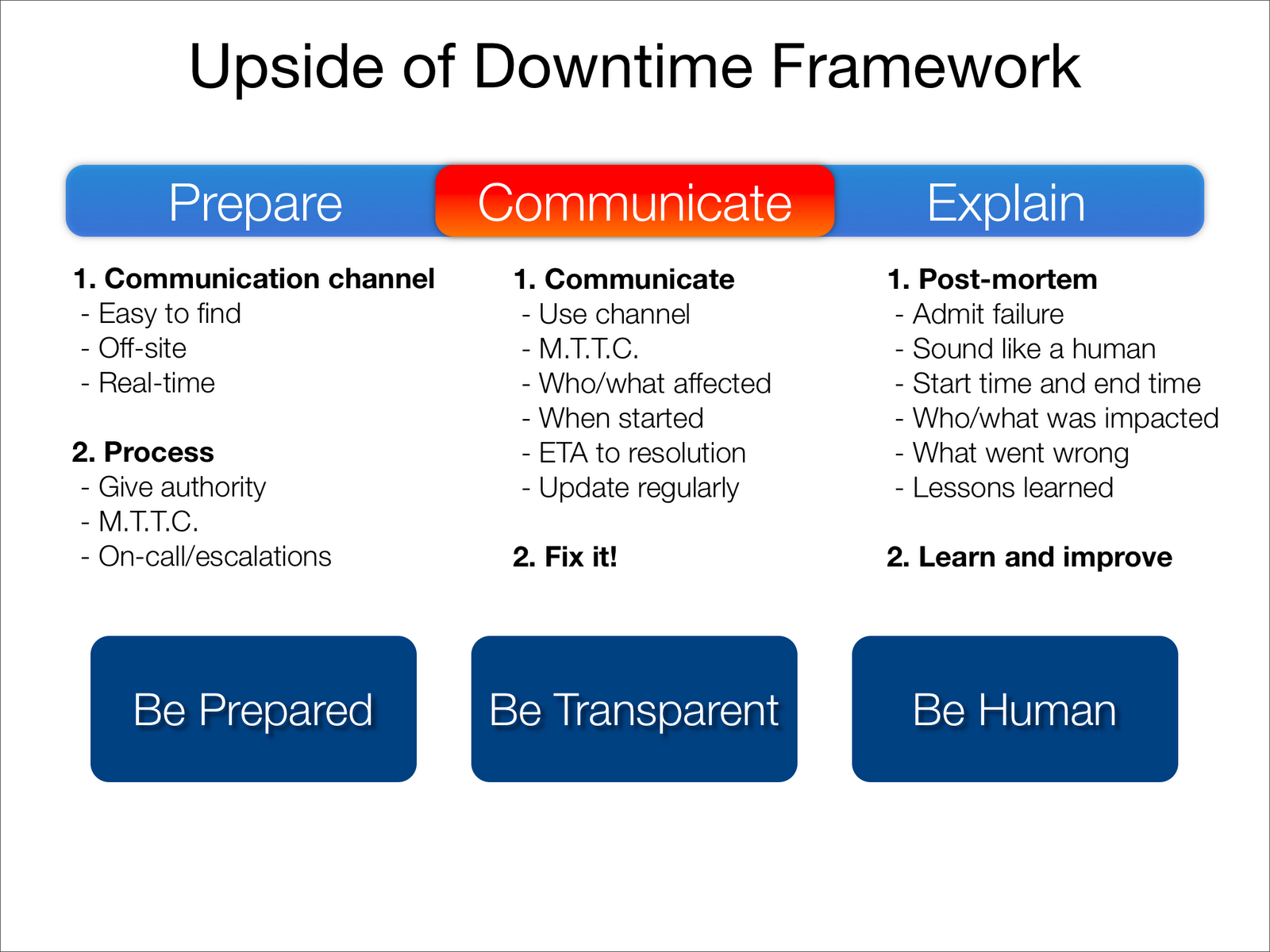
I presume there is a rational explanation for this. I even see a hint of method to this madness. Unfortunately when your customers are in a rush to figure out why their website is collapsing, they won't be in the mood to think about this rationally. Rackspace may be one of the the most experienced companies on the planet when it comes to dealing with frantic people. I would suggest taking some of that experience and putting it to work in raising the bar industry-wide for communicating status updates to your customers. To get you started, here are some ideas:

Suggestions to get you started
  1. Consolidate all of your status updates at a single destination. Possibly at http://status.rackspace.com/? If nothing else, have a page there that points visitors to the best place to get updates for their specific service. Link customers to this page from your front page, support portals, and blogs.
  2. Work to get Google/Yahoo/Bing/etc to point to this page for searches such as "rackspace status", "rackspace cloud status", "rackspace health", "rackspace uptime".
  3. You're going in the right direction with the the Email & Apps System Status Page. I would follow this model for your entire service suite (versus the simple blog style).
  4. If you want to differentiate from your competition, you have a number of options. Read this, this, and this.
  5. Continue tweeting, blogging, and Scobleizing. The more communication channels and approaches the better. Just don't make people have to hunt around in a time of need.
You guys are doing all of the hard parts well. You are also in a unique position to understand the benefits of transparency and communication. With a little bit of work, you have the opportunity to create more fans, reduce support costs, and push the industry forward in an important area.

Update: Within 5 minutes of posting this, Robert Scoble pointed me to a Twitter list merging all of the Rackspace twitter accounts:


A great resource, though clearly not something that would be easy to find quickly.

Monday, January 18, 2010

Real-time timeline of cloud health status updates

Putting the combined cloud health status feed mentioned in the previous post on a timeline offers us convenient way to tell what's been going on with each of the cloud providers, and with the cloud in general:


It may be useful to break out each cloud into a separate feed/timeline as well, if you're hosted on a single cloud. If there is interest, I'll post those as well.

Thursday, January 14, 2010

Cloud health RSS feed

You may have noticed I've added a new module to the right side of this blog. This is a new feed I created (using Yahoo Pipes) combining the status update feeds of all of the major cloud providers (who offer feeds), in affect creating a single stream of cloud health status. Feel free to play with the pipe and add anything I may have missed.


Update: Improved on the original pipe by prepending each cloud feed with it's name, to more easily tell which cloud is reporting the problem:


Amazon responds to scalability concerns

Thanks to the fine reporting by Data Center Knowledge, we now have an official response from Amazon regarding the claims against their cloud capacity:

Amazon says that if customers are experiencing performance problems, it isn’t because EC2 is overloaded. “We do not have over-capacity issues,” said Amazon spokesperson Kay Kinton. “When customers report a problem they are having, we take it very seriously. Sometimes this means working with customers to tweak their configurations or it could mean making modifications in our services to assure maximum performance.”

Only time will tell whether this is a recurring issue (and something competitors will exploit), or an unsubstatiated fluke.

Update: The debate continues...

Wednesday, January 13, 2010

EC2 cloud beginning to burst?


There is talk of EC2 starting to hit some real world limits:
Amazon in the early days was fantastic. Instances started up within a couple of minutes, they rarely had any problems and even their SMALL INSTANCE was strong enough to power even the moderately used MySQL database. For a good 20 months, all was well in the Amazon world, with really no need for concern or complaint.
...
As time went on, and our load increased, the real usefulness of the SMALL instances, soon disappeared with us pretty much writing off any real production use of them. This is a shame, as many of our web servers are not CPU intensive, just I/O instensive. Moving up to the "High-CPU Medium Instance" as our base image has given us some of that early-pioneer feeling that we are indeed getting the intended throughput that we expect from an instance. Feel somewhat cheated here, as Amazon is forcing us to go to a higher priced instance just because they can't seem to cope with the volume of Small instances.
The post goes on to show evidence for the slowdown. In addition, cloudkick posted its own evidence:


Amazon's response, or lack thereof, will be telling. Competition with Rackspace is heating up, and this could develop into a major problem for AWS if not handled well.

Update: Some reaction from the community, re-affirming the importance of communication and transparency:
"It really bugs me that Amazon rarely admits the many faults that go on within their cloud. The status page just shows all green with no notes, even when you see multiple major sites drop off the web, report problems on Twitter, etc.

Numerous times I've had EC2 and EBS go out of contact (or simply have huge network latency, essentially the same). Since my instances run off RAID arrays of EBS volumes, essentially everything dies until EBS reappears." -- dangrossman (HN)


"You leave out one of the biggest problems with AWS, the super lack of documentation and well maintained community sites. This is really where much of the problem lies. If people could more effectively communicate, it would make everybody's life easier on there." -- Adam Nelson (Comments)


Tuesday, January 12, 2010

How to compare website monitoring services

When looking for an external website performance monitoring service, it's often unclear what exactly you should be comparing when reviewing the various offerings. The list below is an effort to break down the key components of any monitoring service, to help you make an more informed decision. This guide applies to any level of service, from your Pingdom's to your Webmetrics':

Monitoring platform
  1. Browser technology - is it emulated or is it using a real browser? Real browser monitoring is a must, unless you are on a tight budget or real-user performance is not a concern.
  2. URL versus transaction - does the service handle transactional monitoring, or only hard-coded URL's? The importance of this depends on what you are monitoring.
  3. Robustness of the scripting language - how does it handle redirects, errors, and minor changes to the site? Does it hard-code URL's and values, or does it use the DOM to navigate the site? Script a few transactions, see how easy the process is, and how reliably the script plays back.
  4. Ability to measure image/objects - does it download image/objects, or just the HTML? Does it download them in parallel, similar to a browser, or serially? Real browser monitoring should have this functionality built-in.
  5. Frequency - how often is your site/application tested? Generally, every 1-5 minutes is what you're going to want.
Alerting
  1. Timeliness - how quickly are you notified of an event?
  2. Details - how much does the alert tell you? Does it help you understand and solve the problem? Look for traceroutes, a screenshot, and details on where the problem happened.
  3. Accuracy - are you falsely alerted? Is the service missing events?
Reporting
  1. Clarity - are the reports easy to understand? Will others "get" them when you send them around?
  2. Flexibility - are you able to get the data you need out of the standard reports? Can you customize the reports to show you only what matters to you?
  3. Ad-hoc and scheduled - can you generate reports at-will, and schedule them to be emailed to you and other parties?
  4. Speed - do you have to wait hours for your reports to generate?
  5. Details - can you see the holistic picture and also drill down into individual samples?
  6. Historical data - how long is your data kept in the system? Can you compare quarter-over-quarter performance? Year-over-year?
Network
  1. Reach - how many different locations around the world can you monitor from? Make sure you cover the areas that most of your customers are coming from.
  2. Flexibility - how many locations can you actually use? Does it cost extra to get what you need?
  3. Reliability - can you get data from the locations you are interested in consistently? Watch for missing samples from the locations that matter most to you.
Web portal
  1. Flexibility - Can you configure your monitoring settings (e.g. URL/script, timeout thresholds, alert contacts, monitoring locations, maintenance windows, keyword matching) quickly and easily? Make sure you can update all of the settings that may change without having to call anyone.
  2. User experience - is it pleasant to use the portal? Can you navigate around and find what you need easily? Is it fast? Is it reliable?
API's
  1. Existence - does the service offer API's?
  2. Power - how much can you do with the API's? Can you take your data out of the system, both the raw data and the processed/averaged data? Can you control your settings, such as turning monitoring off and updating alert contacts, through the API?
  3. Diagnostics - can you run diagnostic tests, such as pings and traceroutes, using the API?
Diagnostics
  1. Tracreroute - can you run traceroutes ad-hoc from any of the monitoring locations any time?
  2. Real-time test - can you test your site form any of the locations ad-hoc, and get the results in real time?
Price
  1. Coverage - how much will it cost you to monitor all of your critical web sites/apps, on a reasonable interval, from the locations you require?
  2. Balance - find the balance between cost and quality of coverage. This may be the most difficult part of your decision. Look at the cost of downtime (e.g. lost revenue, negative customer reaction, marketing) to determine your ROI.
Other
  1. Root-cause - how much does the service help you in determining the root-cause of an event, reducing your MTTR.
  2. Internal monitoring - does the service allow you to monitor your behind-the-firewall sites, or from inside your office?
  3. Load testing - can you use the same monitoring scripts to run load tests against your site?
  4. Professional services - does the service offer consulting to help you with broader performance and reliability concerns?
  5. Customer service - is the company pleasant to deal with? Will they be your partner, or the bane of your existence? Look for someone you can rely on, because monitoring is all about trust.

Of this list, the most important elements to any monitoring solution (the points of comparison that should weight heaviest on your decision) are:
  1. Browser platform - is it a real browser or not?
  2. Frequency of monitoring - cost is generally the main factor here
  3. Locations - the more locations to choose from the better
  4. Alerting - is it accurate, is it useful?
  5. Reporting - a big reason to use a monitoring service

Wednesday, July 15, 2009

SLA's as an insurance policy? Think again.

From Benjamin Black:

"if SLAs were insurance policies, vendors would quickly be out of business.

given this, the question remains: how do you achieve confidence in the availability of the services on which your business relies? the answer is to use multiple vendors for the same services. this is already common practice in other areas: internet connection multihoming, multiple CDN vendors, multiple ad networks, etc. the cloud does not change this. if you want high availability, you’re going to have to work for it."

Well put. As Wener Vogels continues to preach, everything fails. Build your infrastructure where SLA's are a bonus, not a requirement.