Today was a very special day. It was more than simply watching history in the making. Change became more than just a saying on a button. In many ways we are not just ushering in a new President of the United States of America, but we are ushering in a new way of thinking and of doing business. It's time for everything to be more open.
...Facebook became more open.
While Facebook is, without question, the leading online social network, the general flow of it is very linear. Unlike the quick-bite snippets you can grab in a Twitter feed, the Facebook status updates seemed pretty pale in comparison. However, their deal with CNN to broadcast the big day by having the status updates run alongside the live streaming video from Washington was a game-changer. The ability to see what your "friends" were saying and being able to switch to see what everyone else was saying enabled us all to get beyond the fishbowl. It was an amazing blend of traditional mass media reporting and everyone's individual point-of-view collected in one location. Opinions, emotions and even contrary perspectives were public, available and accessible. Plus, if you had something more to add (relevant, idiotic or different), all opinions were equal.
CNN became more open.
Along with allowing all Facebook commentary to run alongside of their broadcasting, they even demonstrated Microsoft's amazing photosynth technology (if you have never seen photosynth in action, you can see it here: TED - Blaise Aguera y Arcas - Jaw-dropping Photosynth demo). People who attended the inauguration were encouraged to send in their photos. The 11,000-plus pictures were dumped into photosynth to give an entirely new photographic representation of this special moment in time. CNN did not stop there. Throughout the day, there were constant references to not only the online channel and conversation that was taking place online, but also the many ways in which the public could share this moment with the world.
The White House website became more open.
The big news on both Twitter and Facebook was that as President Obama was being sworn in, the White House website had already been updated. Even more interesting is how prominent The White House Blog is on the website (granted, there's not that much there just yet). Companies still grapple with whether or not they can handle having a Blog and being that "open." The answer is: if the White House is trying it, why can't you?
Open is good for business.
Maybe your business is still struggling to understand these many new channels. Many businesses still have a more traditional work ethic. If I saw one thing today, it was that all of these more traditional institutions either tried to open up just a little bit more or partnered with someone who would help them open up. Guess what? It worked. People liked how CNN flowed. They were thrilled to see a new White House website. It was memorable to share this moment with your Facebook friends from around the world. It was nothing complex. In fact, it was pretty simple.
If we really want change to happen, opening up just a little bit may well be one of the better ways to see what happens. How will things change? Well, there's word that the President will keep his BlackBerry to stay more "connected to the people." One might argue that this also makes him more accessible... more open. What if you opened up a little bit more? What would happen to your marketing? What would happen to your business?
Tuesday, January 20, 2009
Change has come to America: Being Open


Obama takes office...and Facebook/CNN flourish
The blogosphere, myself included, often point only at the problems and ignore to times when everything works as expected. This looks to be very much the later. Kudos to Facebook and CNN for putting together such a powerful service, on such a powerful day, without issue.In the end, not only did Facebook Connect provide an interactive look into the thoughts and feelings of all those watching CNN's coverage via the web - it did so without crashing. According to the statistics, there were 200,000+ status updates, which equaled out to 3,000 people commenting on the Facebook/CNN feed per minute. Right before Obama spoke, that number grew to 8500. Additionally, Obama's Facebook Fan Page has more than 4 million fans and more than 500,000 wall posts. (We wonder if anyone on his staff will ever read all those!).
CNN didn't do too badly either. They broke their total daily streaming record, set earlier on Election Day, and delivered 5.3 million streams. Did you have trouble catching a stream? We didn't hear of any issues, but if you missed out, you can watch it again later today.
Update: Spoke too soon :(
Thursday, January 15, 2009
GoDaddy.com down intermittently today. What lessons can we take away?
A distributed denial-of-service attack turned dark at least several thousand Web sites hosted by GoDaddy.com Wednesday morning. The outage was intermittent over several hours, according to Nick Fuller, GoDaddy.com communications manager.
What caught my eye was some insight on how GoDaddy handled the communication during the event:
To add to the consternation of Web site owners, GoDaddy.com's voice mail system pointed to its support page for more information about the outage and when it would be corrected. No such information was posted there.Luckily this didn't blow up into anything major for GoDaddy, but I'd like to offer up a few suggestions:
- If you're pointing your customers to the default support page, make sure to have some kind of call-out link referencing this event. Otherwise customers will be searching through your support forums, getting more frustrated, and end up typing up your support lines (or Twitter'ing their hearts out).
- Offer your customers an easy to find public health dashboard (e.g. a link off of the support page). There are numerous benefits that come along with such an offering, but this specific situation would be a perfect use case for one.
- Provide a few details on the problem in both the voice mail message, and in whichever online forum you choose to communicate (e.g. health dashboard, blog, twitter, forums, etc.). At the minimum, provide an estimated time to recovery and some details on the scope of the problem.
Update: A bit of insight provided by GoDaddy’s Communications Manager Nick Fuller.
Tuesday, January 13, 2009
The bulls**t of outage language
I'll let you read the advice yourself, but I will point out a few of the visitor comments that speak to the message I've been harping on over the past few months:Service operators generally suck at saying they’re sorry. I should know, I’ve had to do it plenty of times and it’s always hard. There’s really never a great way to say it, but there sure are plenty of terrible ways.
One of the worst stock dummies that even I have resorted to in a moment of weakness is this terrible non-apology: “We apologize for any inconvenience this may have caused”. Oh please. Let’s break down why it’s bad...
Josh Catone:and
Serious question: What WOULD be a better way to communicate with customers after downtime in your opinion? You didn’t offer and alternatives. I know you said stock responses should never be used… but I’d love to see some examples of what you think works..
and
Mark Weiss:and
While a personal well thought out apology is nice. As a user I want to know when things are going to be working again. I want to know if I should go for a quick walk in the park or if I have time for some food, drinks, and then possibly a nap.Just keep me informed so I know how to manage my time.
I think Flickr holds top honors for the best down time strategy and message. http://blogs.zdnet.com/Burnette/?p=147
Itinerant Networker:
Empathy’s not enough. Service providers should reveal details about why an outage happened, what they’re doing to make it not happen again, and should clearly communicate with customers (frequently) on the ETA of the outage. The most frustrating thing I hear is “we don’t have an ETR [estimated time to recovery]”. That is not acceptable in a service business – give me an ETR and then an estimate of how reliable the ETR is. This goes for even the lowest cable modem user calling $provider – the tier 1 guys should have at least some clue.
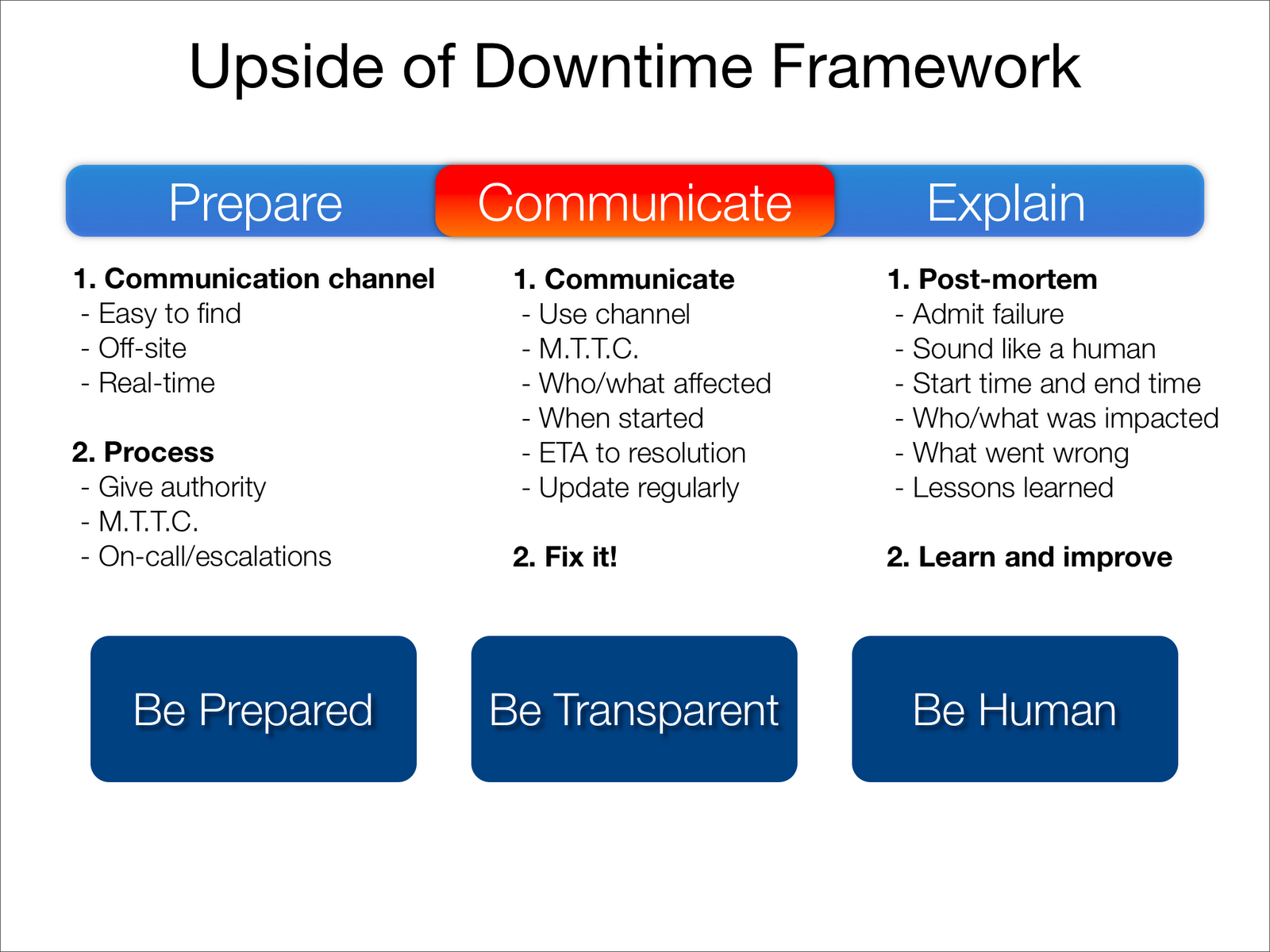
The bottom line is that what matters most is not that you never go down, but how you deal with that downtime. All your customers need is some form of honest communication during the event, some transparency into the severity of the problem, and a human explanation of what went wrong afterward. It really isn't very hard.
Saturday, January 10, 2009
How transparency can help your business
 When looking to gain the benefits of transparency (into your downtime and performance issues), you first need to understand the use cases (or more accurately, the user stories) that describe the problems that transparency can solve. It's easy to put something out there looking for the press and marketing benefits. It's a lot more challenging (and beneficial) to understand what transparency can do for your business, and then actually solve those problems.
Transparency user stories
As an end user/customer:
- Your service seems to be down. I'd like to know if it's down for anyone else or if it's just me.
- I know your service is down, and I want to know when it'll be back up.
- I want some kind of explanation of why you went down.
- Before betting my business on your service/platform, I need to know how reliable it has been.
- My own customers are reporting that my service is down, but everything looks fine on my end. I need to know if your service is down, and if so I need information to keep my customers up to date.
- I want to find which link in my ecosystem of external services is broken or slow right away.
- One of my customers reported a problem in the past, and I'd like to correlate it with hiccups your service may have had in the past.
- I need to know well in advance of any upcoming maintenance windows.
- I need to know well in advance if you plan to change any features that are critical to me, or if the performance of the service will change.
- I want my customers (and my prospects) to trust my service. I don't want my customers to lose that trust if I ever go down.
- My support department gets flooded with calls and emails during a downtime event.
- I want to understand what the uptime and performance of my services are at all times from around the world. Both for internal reasons, and to help my customers diagnose issues they are reporting.
- I want to differentiate from my competition based on reliability and customer support.
Thursday, January 8, 2009
Salesforce.com down for over 30 minutes, and what we can learn from it
Update: Again, Twitter ends up being the best place to confirm a problem and get updates across the world:
 Update 2: Salesforce has posted an explanation of what led to the downtime (
from trust.salesforce.com):
"6:51 pm PST : Service disruption for all instances - resolvedUpdate 3: Lots of coverage of this event all over the web. All of the coverage focuses on the downtime itself, how unacceptable it is, and bad this makes the cloud look. That's all crap. Everything fails. In-house apps more-so then anything. We can't avoid downtime. What we can avoid is the communication during and after the event, to avoid situations like this:
Starting at 20:39 UTC, a core network device failed due to memory allocation errors. The failure caused it to stop passing data but did not properly trigger a graceful fail over to the redundant system as the memory allocation errors where present on the failover system as well. This resulted in a full service failure for all instances. Salesforce.com had to initiate manual recovery steps to bring the service back up.
The manual recovery steps was completed at 21:17 UTC restoring most services except for AP0 and NA3 search indexing. Search of existing data would work but new data would not be indexed for searching.
Emergency maintenance was performed at 23:24 UTC to restore search indexing for AP0 and NA3 and the implementation of a work-around for the memory allocation error.
While we are confident the root cause has been addressed by the work-around the Salesforce.com technology team will continue to work with hardware vendors to fully detail the root cause and identify if further patching or fixes will be needed.
Further updates will be available as the work progresses."
"Salesforce, the 800-pound gorilla in the software-as-a-service jungle, was unreachable for the better part of an hour, beginning around noon California time. Customers who tried to access their accounts alternately were unable to reach the site at all or received an error message when trying to log in.That's where SaaS providers need to focus! Create lines of communication, open the kimono, and let the rays of transparency shine through. It's completely in your control.Even the company's highly touted public health dashboard was also out of commission. That prompted a flurry of tweets on Twitter from customers wondering if they were the only ones unable to reach the site."
Sunday, January 4, 2009
A comprehensive list of SaaS public health dashboards
Note: This list is divided up into three tiers. The tiers are determined by a rough combination of company size, service popularity, importance to the general public, and quality of the end result.
Tier One
- AWS Service Health Dashboard (http://status.aws.amazon.com/)
- Trust.salesforce.com - System Status (http://trust.salesforce.com/trust/status/)
- Zoho Service Health Status (http://status.zoho.com/)
- OpenDNS System Status (http://system.opendns.com/)
- OpenSRS System Status (http://status.opensrs.com/)
- Google App Engine System Status (http://code.google.com/status/appengine)
- QuickBase Service Status (http://service.quickbase.com/updates.aspx)
- NetSuite System Status (http://status.netsuite.com/status.html)
- Mogulus Service Health (http://www.mogulus.com/support/servicehealth)
- Skype Heartbeat (http://heartbeat.skype.com/)
- BlueTie Real Time Status Center (http://support.bluetie.com/?q=node/819)
- Twitter Status (http://status.twitter.com/)
- SAP System Status (http://www.sytecpa.org/technical/systemStatus.asp)
- University of Florida Service Monitoring (http://open-systems.ufl.edu/status/)
- Capitalserv - Current service status (http://www.capitalserv.com/current_service_status.aspx)
- Everyone.net Email Service Status (http://www.everyone.net/main/scripts/status.cgi)
- MSN Messenger Service Status (http://messenger.msn.com/Status.aspx)
- Federal Reserve Financial Services Service Status (http://www.frbservices.org/app/status/serviceStatus.do)
- Boardhost Service Status (http://status.boardhost.com/)
- Primus System Status (http://systemstatus.iprimus.com.au/)
- World of Warcraft Service Status (http://forums.worldofwarcraft.com/board.html?forumId=11113&sid=1)
- Second Life Grid Status Reports (http://status.secondlifegrid.net/)
- GitHub Status (http://github.wordpress.com/)
- The WELL System Status (http://www.well.com/status.html)
- MODIS Rapid Response System - System Status (http://rapidfire.sci.gsfc.nasa.gov/status/)
Again, the full list can always be found here. If I missed any public dashboards, I'd love to know...simply point to them in the comments and I'll make sure to add them to the list.

Dan Gebhardt:
I’d recommend using a website monitoring service (we use Pingdom [editors note: *cough* Webmetrics *cough*]) to provide public accountability for your uptime. This not only proves that uptime is as important to you as it is to your customers, it can also help customers see any particular outage in the context of your overall service record.